

New Feature Fridays: New Font Chooser + New Animation Options + Bugz Bugz Bugz
Another whirlwind week here a GCrafter HQ. Apart from working on projects for customers, I had the time to slip in something that's been driving me nuts for ages.
Fonts, Google Fonts. All of Them
Figuring out how to get all 1800+ fonts in the Google Fonts library has been on my bucket list for a while now. The question was always how, or at least how to do it in a way that would make some kind of sense, make them filterable and see the results and then apply them backwards and forwards to your text in PartLab. We settled on just a few fonts in the font dropdown, by default. This is includes the best stencil fonts, a cool handwriting font, and a couple basic sans-serif fonts. That seemed like a good balance, because how often are fonts really going to be used in a CNC / Laser project. But this frankly seemed too limiting, and who am I to say what you guys want to build, engave, vcarve, pocket.
So now, just click that little search button:
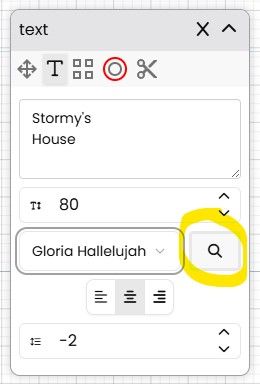
And then you'll see:
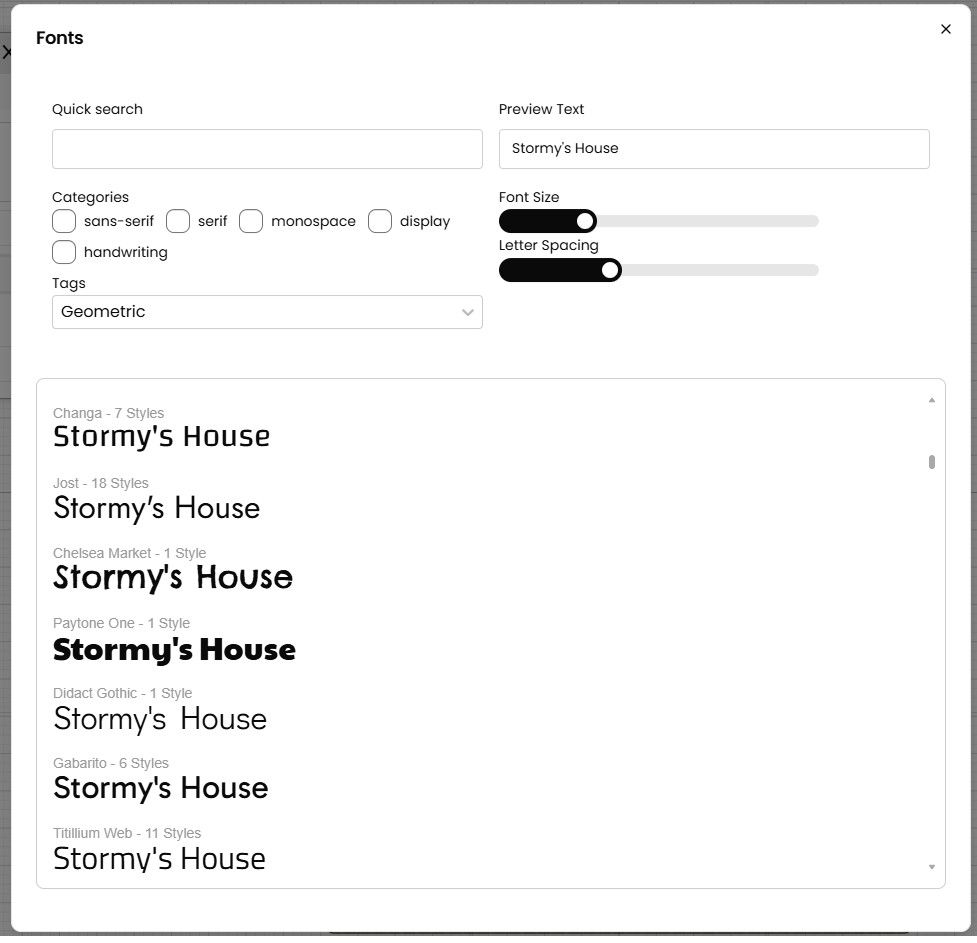
Which will let you sort by categories and tags. Want a brushed, futuristic, medieval? Just search the tags. See what the font looks like, with your text. Then figure out how you want to chop it on your machine. You laser guys get all the fun, because of your nice tight beams. CNC guys, umm V-Bit?
Animation Updates
Animation was something I chucked into GCrafter last fall. I admit it was a bit wonky, but it did the job if you wanted to see what a drawer looked like open or a top lip rotating up. In this push, you can now rotate Project Items. Why? Good question, again I don't have all the answers, or know where you guys are going to take your designs. Additionally, Part animation go a revamped experience and more uniform interface to match part positioning. In the old world, you could rotate or move a part, but you couldn't do both at the same time. You can now. It used to be that if you wanted to rotate a part, you had to choose the axis of rotation (e.g top front, left front, back bottom). If you need precise rotation, this is still there, along with ability to set your own axis of rotation. But this is a bit brute force, if you just want simple.
Why animation at all?
What I was designing things in CAD, pre GCrafter, or before GCrafter reached stable status, I had these drawers I modeled in a frame, and I wanted to seem them open. Good lord, I had no idea of freaking difficult that would be. Rhino3D was my cad tool of choice, and they wanted $200, on top of the $900 (i had already spent), just to animte a part. So I tried the plugin. Bah. Way too much work for something so simple. You may have noticed, that GCrafter has an "Explode" button, and no, it won't destory your project. It's just a quick way to move all the parts outward so you can get a better sense of how your project is all fitting together. Animation is really just there to help you better visualize the outcome. Wood is Expensive. Animation is cheap. You can switch into all the various views, Othro, for example, wireframe turned on, looking from the side. You can actually check clearances, to make sure you aren't going to get collisions in the final build.
Bugz
Just a ton of small stuff.
- Normal & Tangent intersections, for the line tool in PartLab. Yes, they now work
- Improvements to PhotoStudio prompts
- Sign Up. There was a bug in the initial signup where you had to press the "Save" on the profile setup twice
- Floating Point errors on edges. Floating points have been the bane of my existence for over a year, because computers are terrible at decimal calculations.
Embed GCrafter on your site.
I was looking at my design website ( gstreetdesigns.com ), and a year ago I realized I had uploaded 3d models of some of my designs. I thougt having the models would be a great idea, however I presents a bit of a security risk, at least from an IP standpoint, because anyone could download those models, and easily reverse engineer all my hard work. Because GCrafter doesn't really have a file format, embedding the files on another site, is way easier and safer. Plus the viewer experience is a hell of a lot better. So Pro users, you'll find the secret URL in the project settings to embed a GCrafter viewer on the site of your choice.
Few. That's enought for this week.
Happy Making,
Andy